SynaRoute

Desktop app · Runs entirely on your machine · No account

Many keys backing each other up, many models thinking together

A local API routing proxy that manages keys and models from multiple vendors for Claude CLI, the Claude desktop app and the Codex desktop app.

When the primary key errors out, the next one takes over. It can also put several models on the same question in parallel and have a decider synthesise the answer.

  • Windows
  • macOS
  • Linux

Current version v0.1.69

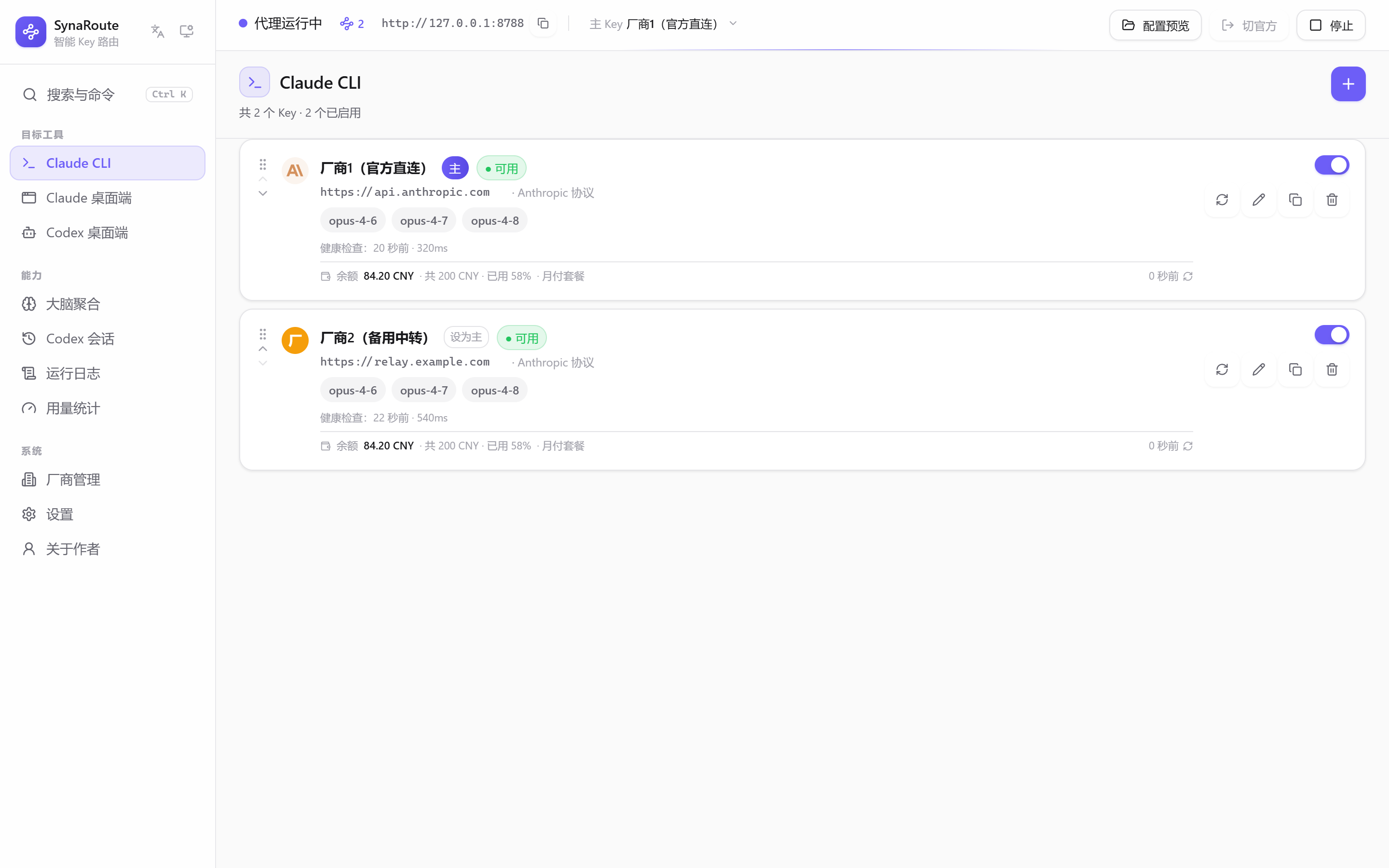
SynaRoute main window: the Claude CLI category listing several vendor keys with priority order, health status and the local proxy endpoint

Why you'd want it

The things multi-key users do by hand every day, handed off to a resident app.

Automatic failover

When a key is exhausted or blocked, the next one takes over within the same request.

Two layers. A key that fails three times in a row is parked for 60 seconds and skipped, rejoining automatically when the window expires. Separately, when one model is unavailable on one key, only that model is parked — keyed on the real upstream model name, so an alias can't slip past it — starting at two minutes and doubling up to thirty. Upstream's own trouble (rate limits, 5xx) is not charged against the key, and rate-limit retry hints are passed through to the client rather than swallowed.

Three clients, kept separate

Claude CLI, the Claude desktop app and the Codex desktop app each get their own category, and their configs never bleed into each other.

Every category has its own key list, primary key, proxy port and model mappings. Swapping a key for the CLI leaves the desktop app untouched.

Keys stored locally

Config and keys are stored locally, not uploaded to a SynaRoute cloud. Keys authenticate requests to the upstream endpoints you configure.

Windows defaults to account-bound DPAPI; macOS keeps a random encryption key in Keychain. Both can switch to master-password mode. Linux requires a master password and has no fixed-key fallback. Master-password mode uses Argon2id + AES-256-GCM and requires unlocking each launch; forgotten passwords cannot recover keys.

Protocol conversion

When the client speaks one protocol and the vendor hears another, the proxy translates.

Anthropic Messages, OpenAI Chat Completions, and OpenAI Responses convert bidirectionally, covering streaming and non-streaming, tool use, and multi-turn history. This also means failover can cross protocols — the primary and backup keys are not necessarily the same provider.

Signature capability

Let several models think it through, then have one decide

The same question goes to multiple models in parallel, then a decider model you pick synthesises the final answer. Useful for code review, design work and hard debugging — tasks where a single model tends to miss angles.

Members answer in parallel2–4 key + model pairs, running at once
MergeCondense to save quota, or pass everything through
Decider concludesRequired — pick your strongest model
  • Two merge strategies

    Condensed merge has a summariser trim each answer first, which saves quota when you have several members. Full context hands the decider every answer verbatim, which keeps the most information. Concurrency cap and per-member timeout are both adjustable.

  • Reads your code on demand

    You can enable a set of read-only tools so members decide for themselves which files to read, what to search for and which symbols to look up. The tools never write files or run commands, and stay inside the working directory. Off by default — every round resends the full history, so it costs noticeably more quota.

  • Accepts images

    Error screenshots and design mockups work as input: up to 4 images, 5MB each. If any image fails validation the whole call errors out and tells you why — it never silently drops one and hands you an answer that didn't actually look at it.

  • Also works as an MCP tool

    Turn on the MCP server and Codex CLI or Claude Code can call it directly. That channel only returns suggestions and never touches your files — your client still makes every edit.

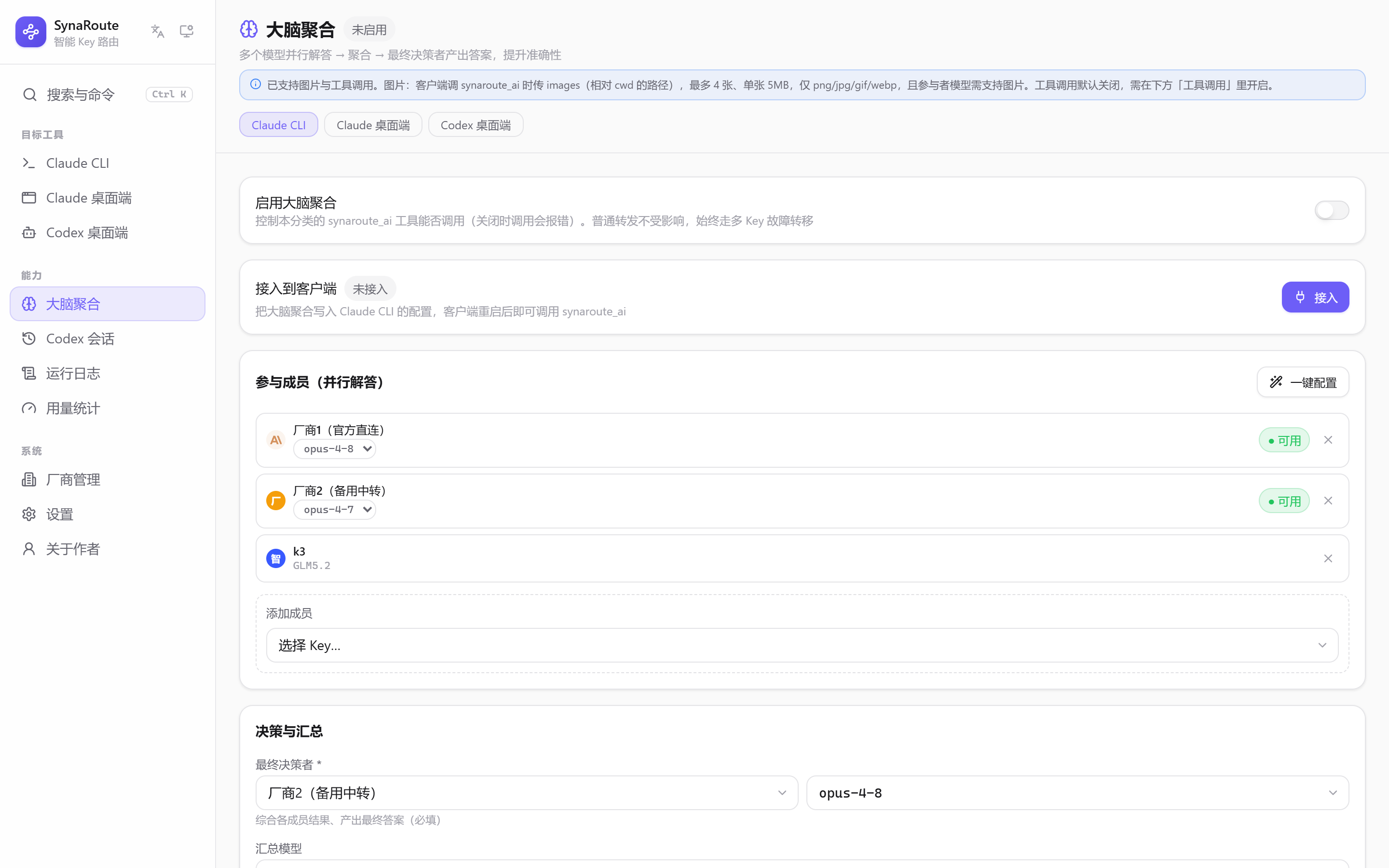
Brain aggregation settings: member list, final decider, merge strategy, concurrency and timeout

Everything else

Built around three problems: many keys, many clients, many protocols.

Model mapping

Map a vendor's real model names onto the names your client expects.

Third-party vendors rarely use the model names your client asks for. Add a mapping and the client keeps calling the name it knows while the proxy translates it to the vendor's real one. You can also set a fallback model for when a candidate key doesn't offer the requested one at all.

Encrypted key storage

Encrypted local storage; master password required on Linux, optional on Windows and macOS.

Windows defaults to account-bound DPAPI; macOS keeps a random encryption key in Keychain. Both can switch to master-password mode. Linux requires a master password and has no fixed-key fallback. Master-password mode uses Argon2id + AES-256-GCM and requires unlocking each launch; forgotten passwords cannot recover keys.

One-click client setup

Hit Start and the proxy endpoint is written into your client's config.

Starting the proxy writes the endpoint into the matching client's config file and stopping it restores the original — with a backup taken before any write. Each of the three clients gets its own fields, so they never overwrite one another. You can preview exactly what will be written before committing.

Request logs

Every forward is inspectable after the fact.

Records when a request was forwarded, which key served it, what the requested model resolved to, what status upstream returned and whether a failover happened. Searchable, with a diagnostic report you can export. Logging full conversation bodies is a separate switch that's off by default.

Config import & export

Take your whole setup with you; import by merging or replacing.

Exports carry a checksum. Because key ciphertext is bound to the local Windows account and won't decrypt elsewhere, exports that include keys are re-encrypted with a passphrase you choose. Machine-local runtime state such as ports and log paths is deliberately left out.

Tray & autostart

Lives in the tray; start/stop proxies and switch primary keys from there.

The tray icon reflects whether proxies are running. Its menu starts and stops each category's proxy and switches the primary key. Optional autostart launches the app minimised to the tray with Windows.

Diagnostic headers

Every response carries one pasteable line: which key served it, how many retries.

Responses include X-SynaRoute-Decision (key / model / attempts / latency on one line) plus request id, upstream status and version. No more guessing which key served a given request — just paste the line. Base URLs and keys are deliberately never included: some relays put the token in the URL path, so echoing the URL would echo the credential.

Per-model lockout

One unavailable model no longer takes the whole key down with it.

The most common relay failure is «this key does not have that one model enabled», while every other model on it works fine. That used to trip the whole key for a minute. Now backoff is per model, keyed on the upstream real model name (keying the public alias would be bypassed by simply using another alias). Three simultaneously locked models on one key escalate to a full breaker — otherwise a key that serves nothing would sit at the front of the pool forever.

Usage & cost

Tokens by category and key, with spend estimated from a built-in price table.

A built-in price table for current models across vendors (including the cache-hit rates, which differ per vendor). Spend is estimated per key; if your relay gives a discount, one cost multiplier calibrates it. When an amount cannot be computed the panel says why instead of showing 0 — and it shows the date the price table was last verified so you can judge how much to trust the estimate.

Balance lookup

See how much credit is left on a relay, right on the key card.

Recognised sites work with zero configuration (endpoint matched by domain; for NewAPI-style sites the internal quota-unit ratio is read live). Unrecognised sites are probed against a few common endpoints and the one that answers is remembered. If nothing answers it says so plainly rather than passing off a quota ceiling as a balance — that would be a wrong number you would believe.

LAN sharing

Optionally let other devices on your network use this machine's proxy — with a token.

By default it listens on loopback only. Turn LAN sharing on and other devices on the same network can connect, but anything that is not this machine has to present an access token. The token is shown, copied and regenerated from the settings page; logs and diagnostic reports keep only its first 8 characters, so a log you paste somewhere cannot give your credit away. The listener binds IPv4 and IPv6 together, so you don't get «some machines connect, some don't».

Codex model picker

Puts non-GPT models into Codex's own model menu.

Connecting Codex also writes a model catalog for it to read, so the models you configured — including non-GPT names like Claude or GLM — show up in its model menu, with reasoning-effort levels attached. Those levels are derived from the upstream protocol: vendors that only have a thinking on/off switch deliberately get none, because changing the level in Codex would do nothing for them. Changing the model list needs Codex restarted once.

A look at the app

Captured from the app's browser preview mode; all data shown is sample data. Click to enlarge.

Key managementA card list where you reorder priority, toggle keys on and off, and see health results and the proxy endpoint.
Brain aggregationConfigure the members that answer in parallel, the decider model and how results are merged.
Request logsWhich key served each forward, what the model resolved to and what upstream returned — searchable and expandable.
SettingsTheme, language, ports, logging and security switches — each one spelling out what it costs to turn on.
Vendor managementKeep the base URLs and protocol types you use often, ready to pick when adding a key.

Download

Free to use. No account required.

Windows

exe · NSIS installer

Version
v0.1.69
Requires
Windows 10 (1809) / Windows 11
Size
6.7 MB

macOS

dmg

Version
v0.1.69
Requires
macOS 11+(Apple 芯片 / Intel)
Size
9.5 MB

Other builds:Intel(9.9 MB)

Recommended for you

Linux

AppImage

Version
v0.1.69
Requires
glibc 2.31+(Ubuntu 20.04+ / Debian 11+ 等)
Size
85.4 MB

Other builds:deb(11.7 MB)rpm(11.7 MB)

Three steps to get going

You don't have to read the whole manual first.

  1. 1

    Download and install

    Grab the installer and run through it. The local config folder is created on first launch.

  2. 2

    Add a vendor key

    On Linux, first enable a master password in Settings → Security. Choose a client category, add a key and enter the vendor endpoint and secret. Saving fetches the available models.

  3. 3

    Hit Start

    Starting the local proxy writes its endpoint into the matching client's config file, after backing up the original.

Use your tools as usual

Go back to Claude Code or Codex and work normally. Requests route through the local proxy; when a key breaks the next one picks up within the same request, and the proxy keeps the accounting plus diagnostic response headers and logs for when you need them.

Claude Code CLI minimum version

The CLI needs 2.1.245 or newer for the proxy to take over model discovery. Older versions still connect, but error out when you pick a model. To update, run npx @anthropic-ai/claude@latest from any directory — it overwrites the old version itself. Check what you have with claude --version.

Data & privacy

All of this describes what the app actually does; you can check it against the source.

Where data lives

Config (config.json) and keys (secrets.enc) live in the user data directory: usually %APPDATA%\SynaRoute on Windows, ~/Library/Application Support/SynaRoute on macOS, and $XDG_DATA_HOME/SynaRoute (or ~/.local/share/SynaRoute) on Linux. Logs may be elsewhere; check the actual path in Settings.

How keys are stored

Windows defaults to account-bound DPAPI; macOS keeps a random encryption key in Keychain. Both can switch to master-password mode. Linux requires a master password and has no fixed-key fallback. Master-password mode uses Argon2id + AES-256-GCM and requires unlocking each launch; forgotten passwords cannot recover keys.

What goes out over the network

Only the upstream vendor requests you configured, plus a check against the GitHub releases page when looking for updates. No usage data, no analytics, no accounts, no config sync.

About logging

Logs contain metadata by default; enabling conversation logging includes message bodies and system prompts, so use it only temporarily for troubleshooting. Windows/Linux prefer logs beside the executable, falling back to SynaRoute/logs in the user data directory if unwritable. macOS defaults to ~/Library/Logs/SynaRoute. Custom log directories are supported; check Settings for the active path.

Removing your data

Before uninstalling, stop the proxy and restore client configuration. Note the data and log directories in Settings, then quit. Remove the SynaRoute data folder (including config, vault and backups), the active log directory, and any previously used custom log directories. Separately remove exported configs, diagnostic reports and client config backups from their saved locations. Deleting only the data directory is not a complete cleanup.

Source code

The source is public on GitHub, so everything above is verifiable. Note that the project does not currently ship an open-source license.

Risks worth knowing

The local proxy listens on a loopback address, so other programs on the same machine can in principle reach that endpoint. Don't expose the proxy port to the internet. Also note that DPAPI protects against the file being copied away — it does not protect against software already running under your account.

Frequently asked questions

The ten questions people actually ask. Every answer describes what the app really does.

Let your keys cover for each other, and your models think together

Free, entirely local, no account needed.